Easydoneit - Task Manager
edi cli
Contents
- Author and Copyright
- Change history
- n.n.n / 2017-07-22
- v1.19 - 2017-07-22
- v1.18 - 2017-07-21
- v1.17 - 2016-10-16
- v1.16 - 2016-10-16
- v1.15 - 2015-07-23
- v1.14 - 2015-01-22
- v1.13 - 2015-01-20
- v1.12 - 2015-01-09
- v1.11 - 2015-01-03
- v1.10 - 2015-01-01
- v1.9 - 2015-01-01
- v1.8 - 2014-12-30
- v1.7 - 2014-12-26
- v1.6 - 2014-11-30
- v1.5 - 2014-11-17
- v1.4 - 2014-11-15
- v1.3 - 2014-10-18
- v1.2 - 2014-09-13
- v1.1 - 2014-09-11
- v1.0 - 2014-08-27
- v00028 - 2014-08-23
- v00027 - 2014-08-22
- What is Easydoneit cli?
- How to use Easydoneit cli?
- What platforms are supported?
- Install and Downloads
- Easydoneit Web
- Source code
- Setting up a search engine for Easydoneit
Author and Copyright
Copyright © 2019 Spartatek AB
2019-06-28 15:52

License
Easydoneit cli software package is released under the GNU license.
Copyright (C) 2014 Spartatek AB
contact@spartatek.se http://spartatek.se
EASYDONEIT CLI is free software: you can redistribute it and/or modify it under the terms of the GNU Genereric Public License as published by the Free Software Foundation, either version 3 of the License, or (at your option) any later version.
EASYDONIT CLI is distributed in the hope that it will be usesul, but WITHOUT ANY WARRANTY; without even the implied warranty of MERCHANTABILITY or FITNESS FOR A PARTICULAR PURPOSE. See the GNU Genereral Public License for more details.
You should have received a copy of the GNU General Public License along with this program. If not, see GNU licenses
n.n.n / 2017-07-22
v1.19 - 2017-07-22
- fix git support for empty edi databases
v1.18 - 2017-07-21
- Add support for git. The databases can now be synchronized across multiple computers using git
- Add encrypted task, gpg has to be installed in the system for the following commands. The command to create and edit an encrypted task is edi secret. The command to show the text is edi fyeo (for your eyes only), the passwords are hidden automatically on the lines starting the word password followed by a space character
v1.17 - 2016-10-16
- Prints default database in edi data, edi select
v1.16 - 2016-10-16
- Improves user interface: vi without parameters creates new tasks
- Improves user interface: running commands without parameters displays the help.
v1.15 - 2015-07-23
- Displays useful information in edi data, select and show commands
v1.14 - 2015-01-22
- Allows spaces in path to external text editor command
v1.13 - 2015-01-20
- Allows options for external text editor command
v1.12 - 2015-01-09
- Opens text editor and wait until it is closed in edi cr to fixe issues on Mac OSX and Windows platform
v1.11 - 2015-01-03
- Checks inputs before setting up a new database
v1.10 - 2015-01-01
- Fixes issue when adding one line tasks with edi many -1
v1.9 - 2015-01-01
- Adds edi bash to display common aliases for bash
v1.8 - 2014-12-30
- Fixed issue regarding special character in edi add -t
v1.7 - 2014-12-26
- Adds commands to remove colors, attachments and media from tasks
v1.6 - 2014-11-30
- Bugfix release: Keep group order when deleting a linked task
v1.5 - 2014-11-17
- Adds windows support
v1.4 - 2014-11-15
- Bugfix release
- Breaks infinite loops
- Saves time in digital format to avoid problems with locals
v1.3 - 2014-10-18
- Bugfix release, first stable version
- Unittest and 100% code coverage
- Improved user error detection.
v1.2 - 2014-09-13
- edi merge to merge databases
- edi media to add a sound or an image to a task
- edi at to add attachments
- Adds ls -t option to sort by date
v1.1 - 2014-09-11
- Changes behavior for group, edi can have empty group. Groups are converted to task with the cv command
- edi cv converts empty groups to tasks
- edi user to setup username in log file
- edi email to setup email in log file
- edi stats generates statistic for groups. Shows start date, estimated finish date. Creates stat csvs in database root.
- edi many to add many tasks or many groups
- edi demo to show how to use Easydoneit CLI
- edi list to set group list for edi -L, -La and -Lx
- edi ls -s for sorted list by state
- edi -L, -La, -Lx to list task in edi list
- Bug fixes.
- Adds logging
v1.0 - 2014-08-27
- Handles user input errors
- Fixes a bug edi show (print task only once)
- Fixes reorder bug in edi rm
v00028 - 2014-08-23
- Adds autolink command. New tasks are linked automatically to the autolink groups
- Adds edi data -d to delete a database
- Adds creation time in tasks, edi show shows creation time
- Adds convert linked tasks to group, all links are deleted
- Fixes bugs in edi reset
v00027 - 2014-08-22
- Adds show tree st and zip commands
- Adds edi add -t option to add text from command line
- In edi ls, prints ids for groups
What is Easydoneit cli?
Easydoneit cli is a simple task manager for terminals, there are also a GUI version (Easydoneit Desktop) and a web interface (Easydoneit Web). The command line user interface is designed to be similar to git.
Key features
- tasks description of any size
- group tasks
- order and reorder tasks
- easy to keep track of what is done
- more
The image below presents an overview of the database structure. The database is arranged like a regular file system, each task has attributes to keep track of the state.

How to use Easydoneit cli?
The manual describes the common use cases Easydoneit cli manual
The command edi without parameter displays the help, the help for current version is here (edi help)
Easydoneit install demo
This video shows how to install Easydoneit with apt (Debian/Ubuntu).
Demo database
Here is a demo database with tree structures for common use. Demo Database tarball
What platforms are supported?
Microsoft Windows and Unix style platforms: linux distribution, mac os x, cygwin
Install and Downloads
Version 1.19
To run edi from the tarball, python2 needs to be installed on the system.
Ubuntu Snappy
Run in a terminal:
apt-get install snapd
snap install edi
alias edi=/snap/edi/current/bin/edi
Apt
For debian apt setup, add this source to your /etc/apt/sources.list:
deb http://spartatek.se/packages/ unstable/
Then:
apt-get install easydoneit
Easydoneit cli depends on python 2.7.
Virtual Machine (demo)
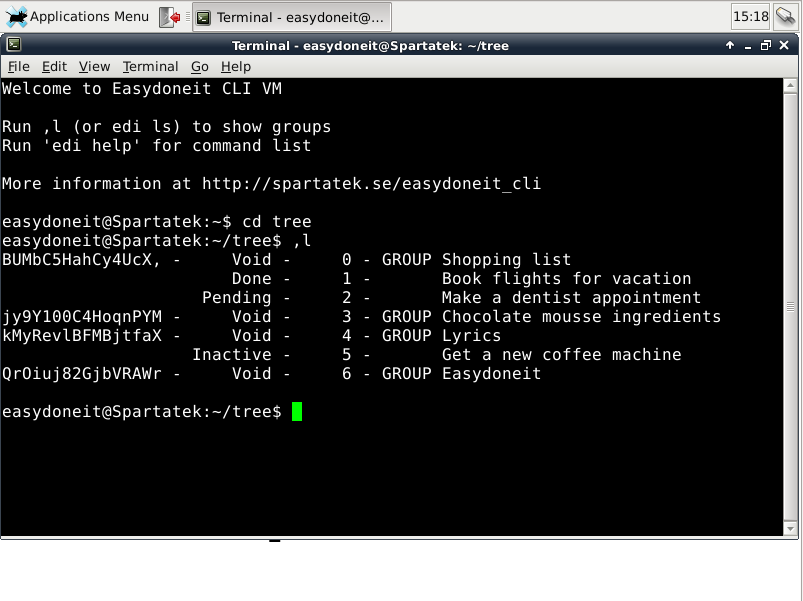
The Easydoneit database through many user interfaces. In the VM, three interfaces are configured:
- Easydoneit CLI (Command line interface)
- Easydoneit Desktop (GUI - Graphical User Interface)
- Easydoneit Web (Access the Easydoneit database through a website, generate slideshows from groups in Easydoneit, display statistics)
Run tar xvjf Easydoneit_cli_vm.tar.bz2 to extract the VM.
With the 'edi html' command, an html page for a group is generated, here is the result for the demo database in the virtual machine:
Virtual Machine screenshot:
Easydoneit Web
The web interface (edi web) allows users to browse an easydoneit database and show the stats of a group in a graph. The most convenient way to install edi web is to use docker.
The url for edi web is:
http://<ip>/edi_web
- Browsing: Demo database. Click on Go to top or Show tree.
- Slideshows: Add tasks in a group and edi web generates a slideshow for the group, each task is a slide and the agenda is automatically generated. Click on Slideshow tree.
- Search: Enter keywords in the search bar to search.
- Statistics: This function shows the statistics for a group in text and in a graph. The graph shows the state of all tasks in the group over time.Click on Stats tree.
Slide example:

Statistics example:

Docker setup
Docker is a system to build containers and ship them to server. Edi web is in a docker image ready to use (edi web docker image). Below are the instructions to setup the easydoneit database for use with edi web and setup edi web's docker image. Lets assume the location of the easydoneit database is ~/easydoneit_data (default).
Easydoneit database setup:
cd ~/easydoneit_data
touch stats.csv
sudo chown www-data:www-data stats.csv
touch stats_creation_done_inactive.csv
sudo chown www-data:www-data stats_creation_done_inactive.csv
Install the docker package from apt and ship edi web's docker image (note: enter the absolute path to easydoneit_data, ie /home/<user>/easydoneit_data)
sudo apt-get install docker.io
sudo docker run --name edi_web -d -p 50000:80 -p 50443:443 -v /home/<user>/easydoneit_data:/var/www/easydoneit_data remynoulin/easydoneitweb:v1.14
Then the url to edi web is:
http://localhost:50000/edi_web/
or
https://localhost:50443/edi_web/
Install video showing the steps above.
Setting up a search engine for Easydoneit
The search engine used in this setup is Xapian in a docker container. With the search engine, the search results are fast and it is possible to search for complex queries: multiple words, word subtraction, boolean logic...
Steps to follow:
Install docker
Find the database location in the system
Start the search engine container
Browse to the search page
Install docker:
apt-get install docker.io
Find the database location in the system:
edi data
(Selected data_location)
/home/spartatek/easydoneit_data
Start the search engine container:
Replace the path after -v with your database location.
sudo docker run --name xapian -p 8000:80 -v /home/spartatek/easydoneit_data/tasks:/data -d --restart=always remynoulin/ xapian-omega-alp

The command for indexing the database is:
sudo docker exec xapian /usr/bin/omindex --db /var/lib/omega/data/default --url http://localhost/data/ /data

To update the search engine regularly, run the indexing command in a cron job:
crontab -e
Browse to the search page:
http://localhost:8000/cgi-bin/omega
Type a query to get search results.